
Today I finished implementing a navigation system for the enemies in my Kitty Maze Unreal project. This post is a bit long since I will go into some detail about the implementation. I learned a lot about the Unreal Engine Navigation System and Unreal data types.
- Research and Resources
- Enemy Navigation Implementation
- Polish: Adding Pauses and More Animations
- Final Result
Research and Resources
First, I did some research. I know Unreal comes with some useful AI Navigation tools, so I investigated if I should incorporate those in my implementation.
Useful resources:
- Unreal’s Basic Navigation guide (the code examples are in blueprints)
- This forum thread about AI MoveTo
Enemy Navigation Implementation
From my research, I determined that I should make an AEnemy class derived from ACharacter which will use AAIController to move the enemy.
I also created an AEnemyNode class that will be used to mark locations for the enemy to navigate on its path.
Node Data in AEnemyNode.h
UPROPERTY(EditAnywhere, Category = "NodeData")
FString _enemyName;

UPROPERTY(EditAnywhere, Category = "NodeData")
int _nodeIndex = 0;
I decided a TMap of FVector positions indexed by the enemy name would be the best way to store the data from the enemy nodes. To keep track of the enemy types, I made another TMap that is also indexed by enemy name and has values of TSubclassOf<<AEnemy>> so the enemy blueprints can be assigned in the Editor.
Declarations for enemy types and enemy nodes
UPROPERTY(EditDefaultsOnly, Category = "GameData")
TMap<FString, TSubclassOf<AEnemy>> _enemyTypes;

TMap<FString, TArray<FVector>> _enemyNodes;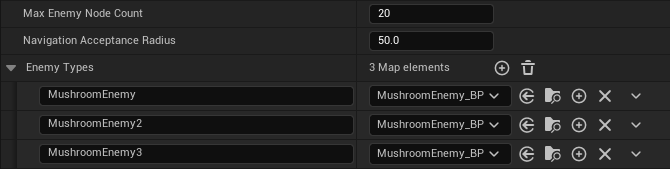
I added the nodes to the scene like this:
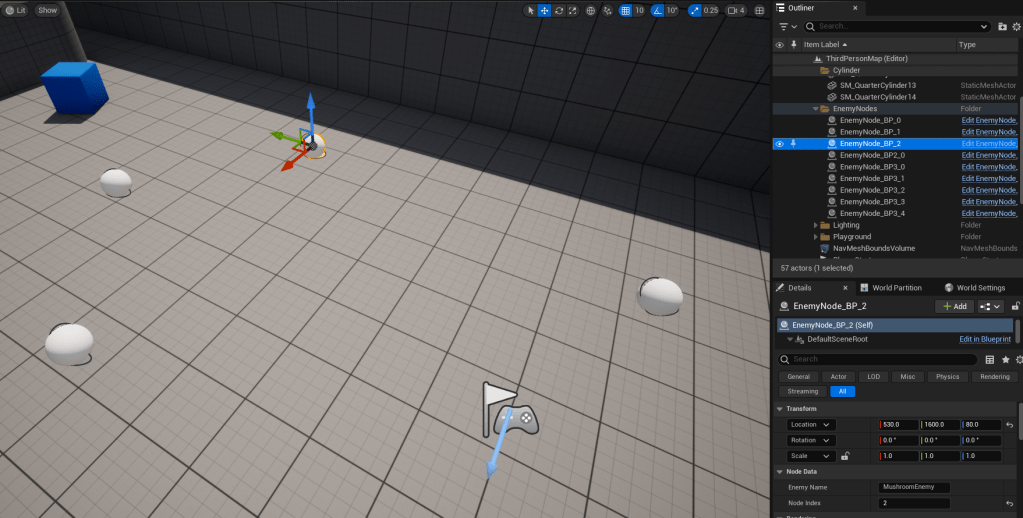
They have the field “Actor Hidden In Game” set to true so they only show up in the level editor.
Right now I have the nodes call InitEnemyNode() in my Game Mode class to initialize the enemy nodes map. I think ideally I would have a separate enemy controller that handles that, but I am saving it for a future refactor.
InitEnemyNode() and GetEnemyNode()
void AKittyMazeGameMode::InitEnemyNode(FString enemyName, int nodeIndex, FVector nodePosition)
{
	if (!_enemyNodes.Contains(enemyName))
	{
		TArray<FVector> enemyNodePositions;
		enemyNodePositions.Init(FVector(), MaxEnemyNodeCount);
		_enemyNodes.Add(enemyName, enemyNodePositions);
	}

	_enemyNodes[enemyName][nodeIndex] = nodePosition;
}

FVector AKittyMazeGameMode::GetEnemyNode(FString enemyName, int nodeIndex)
{
	FVector enemyNodePosition = FVector();
	if (nodeIndex < MaxEnemyNodeCount && _enemyNodes.Contains(enemyName))
	{
		enemyNodePosition = _enemyNodes[enemyName][nodeIndex];
	}

	return enemyNodePosition;
}
Building a Navigation Mesh was really easy. I just dropped the NavMeshBoundsVolume into the scene and it worked! The hotkey for visualizing the Nav Mesh is P.
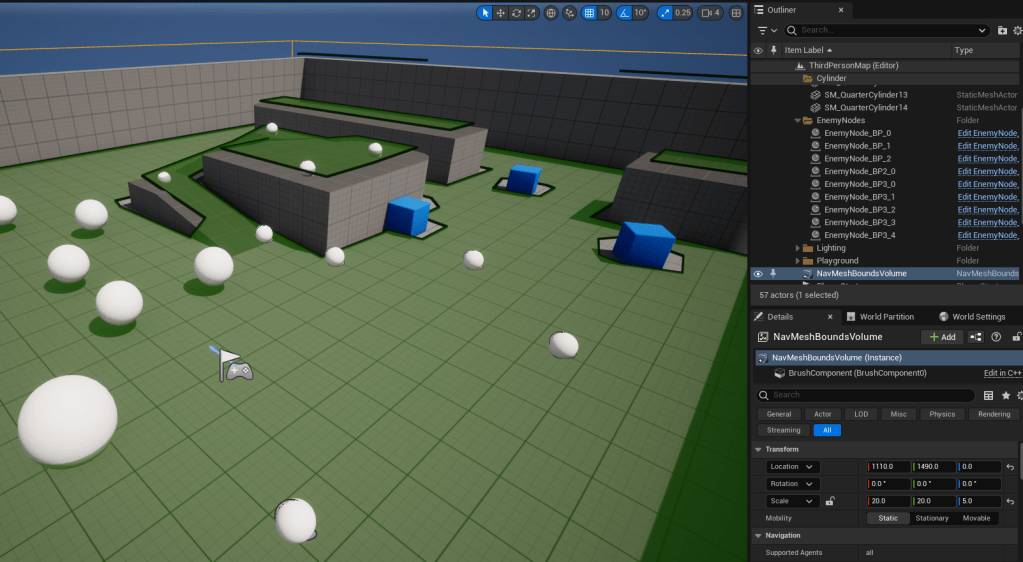
When the game starts, I have the enemies spawn at their first enemy node and start moving towards the second enemy node if there is one. When the enemy reaches a node, it will either move to the next node in the path or back to the first node again.
Enemy Spawning
FRotator defaultRotation = FRotator::ZeroRotator;
FVector defaultPosition = FVector();

for (auto& enemy : _enemyTypes)
{
	if (_enemyNodes.Contains(enemy.Key))
	{
		AEnemy* enemyPawn = GetWorld()->SpawnActor<AEnemy>(enemy.Value.Get(), _enemyNodes[enemy.Key][0], defaultRotation);

		// Only initialize the enemy if there is more than one node associated with it.
		if (!_enemyNodes[enemy.Key][1].Equals(defaultPosition))
		{
			enemyPawn->InitEnemy(enemy.Key, _enemyNodes[enemy.Key][1], NavigationAcceptanceRadius);
		}
	}
}
InitEnemy() and MoveToNextNode()
void AEnemy::InitEnemy(FString enemyName, FVector movePositon, float acceptanceRadius)
{
    _enemyName = enemyName;
    _acceptanceRadius = acceptanceRadius;

    _aiController = Cast<AAIController>(GetController());
    if (_aiController != nullptr)
    {
        _aiController->GetPathFollowingComponent()->OnRequestFinished.AddUObject(this, &AEnemy::MoveToNextNode);

        _aiController->MoveToLocation(movePositon, _acceptanceRadius);

        _currentNodeIndex = 1;
    }
}

void AEnemy::MoveToNextNode(FAIRequestID RequestID, const FPathFollowingResult& Result)
{
    if (_aiController != nullptr && Result.IsSuccess())
    {
        ++_currentNodeIndex;

        AKittyMazeGameMode* gameMode = Cast<AKittyMazeGameMode>(UGameplayStatics::GetGameMode(GetWorld()));
        FVector movePositon = gameMode->GetEnemyNode(_enemyName, _currentNodeIndex);

        if (movePositon.Equals(FVector()))
        {
            _currentNodeIndex = 0;
            movePositon = gameMode->GetEnemyNode(_enemyName, _currentNodeIndex);
        }

        _aiController->MoveToLocation(movePositon, _acceptanceRadius);
    }
    else
    {
        // TODO: Maybe just teleport the enemy to the next node?
    }
}
Here is an enemy navigating in a loop between three nodes:
Polish: Adding Pauses and More Animations
As a little bit of polish, I wanted to have the enemy pause at each node and play a different animation for a few seconds before continuing. This was a pretty simple addition because I just needed to add a timer for the pause and make a few changes to the animation blueprint I had set up for the enemy.
Enemy.h
#pragma once

#include "CoreMinimal.h"
#include "AIController.h"
#include "GameFramework/Character.h"
#include "Enemy.generated.h"

/// <summary>
/// An enemy which can navigate between nodes
/// </summary>
UCLASS()
class KITTYMAZE_API AEnemy : public ACharacter
{
	GENERATED_BODY()

public:
	void InitEnemy(FString enemyName, FVector movePositon, float acceptanceRadius);

private:
	/** Number of seconds that the enemy stops between nodes */
	UPROPERTY(EditDefaultsOnly, Category = "EnemyData")
	float _pauseBetweenNodes = 2.0f;

	int _currentNodeIndex = 0;

	float _acceptanceRadius;

	FString _enemyName;

	AAIController* _aiController;

	FTimerHandle _pauseTimerHandle;

	void OnNodeReached(FAIRequestID RequestID, const FPathFollowingResult& Result);

	void MoveToNextNode();
};
Enemy.cpp
#include "Enemy.h"
#include "KittyMazeGameMode.h"
#include <Kismet/GameplayStatics.h>

void AEnemy::InitEnemy(FString enemyName, FVector movePositon, float acceptanceRadius)
{
    _enemyName = enemyName;
    _acceptanceRadius = acceptanceRadius;

    _aiController = Cast<AAIController>(GetController());
    if (_aiController != nullptr)
    {
        _aiController->GetPathFollowingComponent()->OnRequestFinished.AddUObject(this, &AEnemy::OnNodeReached);

        MoveToNextNode();
    }
}

void AEnemy::OnNodeReached(FAIRequestID RequestID, const FPathFollowingResult& Result)
{
    if (Result.IsSuccess())
    {
        if (_pauseBetweenNodes > 0)
        {
            // Move to the next node after a pause.
            GetWorldTimerManager().SetTimer(_pauseTimerHandle, this, &AEnemy::MoveToNextNode, _pauseBetweenNodes, false, _pauseBetweenNodes);
        }
        else
        {
            MoveToNextNode();
        }
    }
    else
    {
        // TODO: Maybe just teleport the enemy to the next node?
    }
}

void AEnemy::MoveToNextNode()
{
    if (_aiController != nullptr)
    {
        ++_currentNodeIndex;

        // Not saving this to a member variable because I plan on moving GetEnemyNode() to a separate enemy controller in the future.
        AKittyMazeGameMode* gameMode = Cast<AKittyMazeGameMode>(UGameplayStatics::GetGameMode(GetWorld()));
        FVector movePositon = gameMode->GetEnemyNode(_enemyName, _currentNodeIndex);

        if (movePositon.Equals(FVector()))
        {
            _currentNodeIndex = 0;
            movePositon = gameMode->GetEnemyNode(_enemyName, _currentNodeIndex);
        }

        _aiController->MoveToLocation(movePositon, _acceptanceRadius);
    }
}
My enemy animation blueprint is a simplified version of the “ABP_Manny” blueprint that comes with Unreal’s third person starter pack.
First, I added these variables to the blueprint:

Next, I copied the Locomotion state machine from ABP_Manny and made a few adjustments to it.
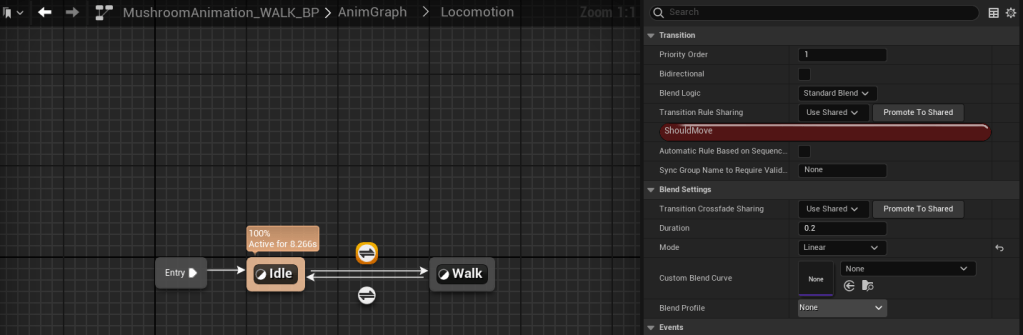
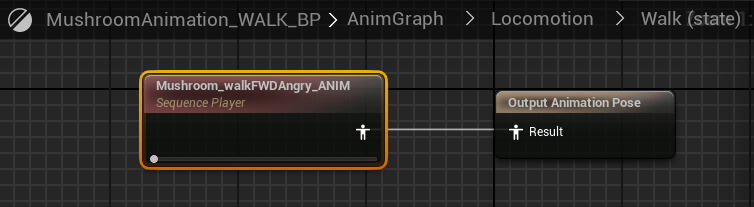
The event graph is also almost the same as ABP_Manny. It initializes the variables for Character, CharacterMovement, Velocity, and GroundSpeed and then sets ShouldMove to true if GroundSpeed is greater than 0.1.

Final Result
Here is the final result with a couple enemies navigating around the level:
My prediction that setting up enemy navigation would take about two work days was correct.
Now that I have a player, collectibles, enemies, and a win/loss condition set up, I am going to import some more assets from Unreal Marketplace to make a real level with a maze for this game.
Don’t get lost! And remember that bad times are just times that are bad.
 Amber Rocio Smith